

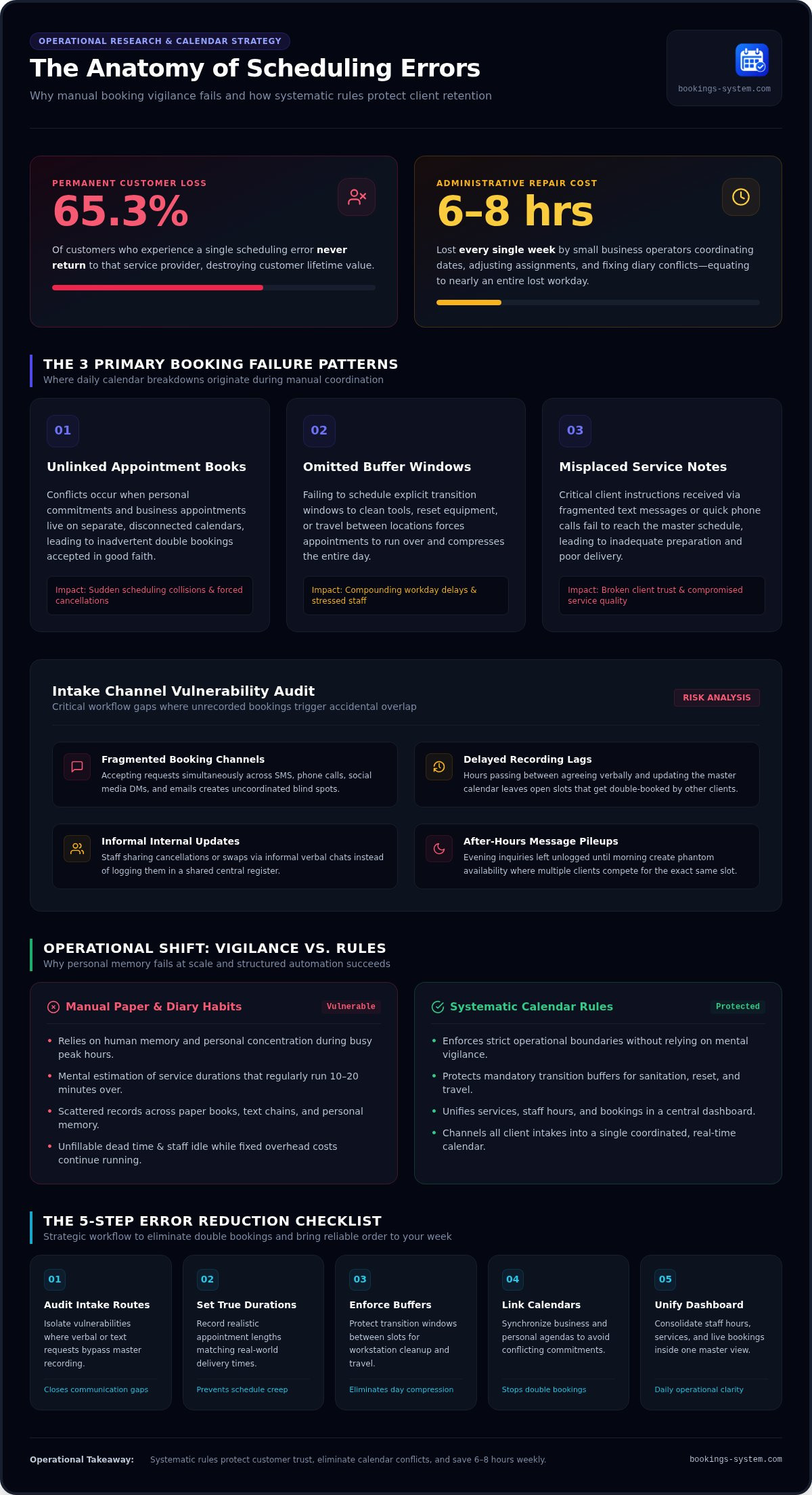
Research indicates that 65.3% of customers who experience a scheduling error never return to that service provider. When you balance appointments across handwritten notes, phone calls, and scattered text messages, staying ahead of your day feels exhausting. Trying to catch mistakes through sheer personal vigilance simply does not work once client volume grows. To protect your business and keep customer trust intact, learning how to reduce scheduling errors requires dependable operational rules rather than constant second-guessing.
You shouldn't have to spend your evenings untangling double bookings, estimating travel buffers, or apologizing for administrative calendar mix-ups. In this guide, you will discover actionable strategies and a structured checklist to eliminate overlapping appointments and bring reliable order to your week. We will walk through the essential calendar rules, buffer habits, and centralized workflows you need to free up mental clarity and focus on quality service.
Key Takeaways
- Fragmented booking across text messages, phone calls, and paper diaries creates blind spots that make administrative mistakes inevitable.
- Follow a practical 5-step action checklist to reduce scheduling errors by setting realistic service durations and protecting transition buffers.
- Rely on systematic calendar rules rather than human vigilance to prevent double bookings and eliminate overlapping appointments.
- Unify your services, working hours, and client bookings inside a central business management dashboard to maintain daily operational clarity.
Why Scheduling Errors Happen: The Hidden Cost of Manual Booking
Scheduling errors happen whenever customer expectations, actual staff availability, and recorded time slots fall out of alignment. A scheduling error is fundamentally an operational breakdown caused by manual data entry, where human handlers misread availability, transpose booking times, or misplace client instructions across disparate records. When your daily agenda depends on manual updates, even a momentary lapse in concentration can unravel hours of booked appointments. Learning how to reduce scheduling errors starts with recognizing how these administrative blind spots form.
The Most Common Types of Booking Mistakes
Most calendar breakdowns stem from predictable recording flaws. Over time, these patterns disrupt your workday and create friction for clients:
- Unlinked appointment books: Booking conflicts frequently occur when personal commitments and business appointments live on separate, unlinked calendars. You accept a booking in good faith, only to discover a preexisting conflict later.
- Omitted buffer windows: Staff need time to clean tools, reset equipment, or travel between client locations. Ignoring these transition periods forces appointments to run over, immediately compressing the rest of the day.
- Misplaced service notes: Key appointment requirements captured across informal text messages or quick phone calls often fail to reach the main schedule, resulting in inadequate preparation.
The Measurable Business Cost of Disorganized Calendars
Administrative errors drain your bottom line long before you notice the lost revenue. Small business operators spend an average of six to eight hours each week coordinating dates, adjusting assignments, and fixing diary conflicts. That is nearly an entire workday lost to administrative repair work. Resolving an overlapping appointment requires hurried phone calls, uncomfortable explanations, and awkward negotiations to shift established plans.
This friction damages your reputation. When a client arrives for a confirmed booking only to find another customer in their slot, their trust disappears. Perceived disorganization leads clients directly to competitors who offer reliable booking experiences. Last-minute adjustments also produce unfillable dead time, leaving staff idle while operational overhead costs continue to run. To protect margins and preserve your professional standing, you must systematically reduce scheduling errors with structured booking controls.
The Error Risk Audit: Where Does Your Booking Workflow Fail?
Most scheduling mistakes do not happen because of carelessness. They happen because your intake process lacks structure. When prospective clients reach out through disconnected touchpoints, tracking confirmed slots becomes an uphill battle. Evaluating your existing intake routines helps you isolate vulnerabilities before they cause costly calendar mix-ups. Conducting an honest workflow audit is the most reliable way to reduce scheduling errors across your business.
Intake Channel Vulnerability Checklist
Scattered intake channels create dangerous operational blind spots. Review your current communication habits against these common risk factors:
- Fragmented booking avenues: Do you accept appointment requests across text messages, phone calls, social direct messages, and email at the same time?
- Delayed recording lags: How many hours pass between agreeing to a verbal request and manually writing it into your master calendar?
- Informal internal updates: Does your team communicate cancellations or slot swaps through quick verbal chats rather than updating a shared register?
- After-hours message pileups: When inquiries arrive late in the evening, do they sit unlogged until the next morning?
Whenever a customer request sits unrecorded in an email thread or text chain, that time appears open to everyone else. A second customer asks for the identical slot, and an accidental double booking occurs. If you want to protect your schedule from these communication gaps, switching to a dedicated online appointment scheduling platform channels client bookings into a single, coordinated destination automatically.
Schedule Parameter and Buffer Verification
Administrative errors also stem from unrealistic time allocations. Relying on mental estimates instead of fixed service boundaries leads directly to compressed, chaotic days. Review how you structure your daily appointment limits:
- Duration accuracy: Do your recorded appointment lengths reflect real-world delivery, or do appointments regularly run ten to twenty minutes over?
- Omitted operational buffers: Have you scheduled explicit windows between appointments to wipe down workstations, restock materials, or travel to the next site?
- Peak-hour congestion: Does your schedule fall behind at the exact same hour every day because early delays compound as the afternoon progresses?
When you pack appointments back-to-back without structured gaps, a single delay ruins your entire schedule. Catching these patterns allows you to build realistic operational buffers into your calendar rules. Hardcoding verified durations removes the guesswork, giving you the breathing room required to maintain a punctual, orderly workday.
Manual Diaries vs. Automated Rules: Why Human Vigilance Fails
Human vigilance has natural boundaries. When you handle phone inquiries while finishing a project or serving an on-site client, your attention fragments. Relying on memory or manual registers carries an inherent error rate of 5% to 8%. Cognitive fatigue inevitably turns manual updates into missed entries. Attempting to reduce scheduling errors by simply concentrating harder cannot solve an architectural process flaw.
| Method | Double-Booking Protection | Buffer Enforcement | Multi-Device Sync |
|---|---|---|---|
| Paper Diary | None (relies entirely on visual checking) | Manual (often skipped during busy rushes) | None (single physical location) |
| Basic Spreadsheet | Weak (requires custom formulas, overwrites easily) | Manual row spacing | Partial (risk of version conflict) |
| Dedicated Booking Platform | Absolute (slots lock instantly upon selection) | Automated (fixed pre- and post-buffers) | Real-time (unified single source of truth) |
The Limits of Memory and Paper Appointment Diaries
Paper diaries cannot actively validate data. A physical ledger allows you to write two names into the same ten o'clock slot without warning you of the conflict. Scrawled shorthand often turns unreadable days later, leaving you uncertain about client expectations. If a single notebook gets lost or damaged, your business records vanish entirely. Paper is passive; it cannot stop you from making mistakes.
How Automated Constraints Protect Your Schedule
Software rules replace human vigilance with reliable boundaries. When a client selects a time slot, the system verifies your existing commitments and closes that opening instantly across all devices. This prevents conflicting entries before they can form.
Configured constraints also protect your working hours without constant gatekeeping. The system applies approved start times, service caps, and required breaks automatically. Clients cannot book outside established parameters, even if they schedule late in the evening. Setting clear systemic rules is the simplest path to reduce scheduling errors, safeguarding your mental clarity and keeping your calendar predictable.
The 5-Step Action Checklist to Reduce Scheduling Errors
Eliminating calendar mistakes requires an orderly, repeatable system rather than intermittent fixes. When you implement clear operating rules, you remove ambiguity for your staff and your customers. Follow this chronological 5-step checklist to systematically reduce scheduling errors across your business.
Step 1 & 2: Standardize Services and Consolidate Booking Intake
Start by auditing your service offerings. Write precise descriptions for every service and establish realistic completion times. If a routine consultation takes 45 minutes, do not record it as 30 minutes simply to make the day look tighter. Clear boundaries prevent service overruns from pushing subsequent appointments off schedule.
Next, channel all appointment requests through a single entry point. Stop taking bookings across separate inboxes, text messages, and unrecorded phone chats. Selecting the right setup is essential; you can evaluate software requirements using this guide to online appointment scheduling for small business. If you are starting fresh, follow our practical walkthrough for setting up a simple appointment scheduler for business.
Step 3 & 4: Lock Buffer Windows and Automate Confirmation Records
Protect your workday by inserting non-negotiable buffer windows. Program automatic 15-to-30-minute gaps between successive sessions to cover workstation resets, cleaning, or transit between client sites. These built-in cushions absorb minor delays before they compound into major calendar pileups.
Pair those buffers with verified intake forms and instant receipts:
- Collect upfront specifications: Require clients to submit essential service notes, addresses, and contact numbers at the moment of booking so no critical details get lost in transit.
- Distribute automated receipts: Send immediate digital confirmations that display explicit appointment dates, arrival times, and selected services. When both parties hold identical written records, misunderstandings disappear.
Step 5: Run Weekly Operational Calendar Audits
Set aside ten minutes every Friday afternoon to review your diary performance. Compare planned appointment durations against actual completion times, and note any recurring friction points. Did a specific service consistently run over? Were your transit buffers wide enough to handle local traffic?
Use these weekly observations to fine-tune your parameters. Adjust allocated durations, confirm upcoming staff availability well in advance, and update working hours before new booking slots open. To implement this structured workflow across your business today, explore our online appointment scheduling platform to keep your calendar running smoothly.
Maintaining Error-Free Scheduling with a Dedicated Dashboard
Putting an operational checklist into practice works best when your tools enforce it automatically. You don't need expensive enterprise software suites or complicated setup routines to run an orderly business. Instead, a clean business management dashboard provides a dependable single source of truth. It translates your booking rules, buffer windows, and duration limits into an automated workflow that runs quietly in the background. When your calendar actively protects your time, you permanently reduce scheduling errors and replace operational stress with calm consistency.
Centralizing Working Hours and Service Parameters
Managing your schedule from a unified control panel keeps your operational boundaries intact. Within the dashboard, you can configure precise working hours so customers only book when your team is available to work. If you take a holiday, schedule personal leave, or face unexpected equipment downtime, you can block out time in seconds. Those adjustments instantly reflect across your public booking page. Maintaining your structured service menu within one central screen also guarantees that each task receives its required completion time without manual re-entry.
Gaining Operational Clarity with an Organized Calendar View
Visual clarity brings immediate mental relief. An organized calendar view lets you inspect upcoming daily and weekly commitments at a glance. You never have to decipher scribbled notes or cross-check separate paper ledgers again. Selecting any scheduled slot immediately displays verified client notes, service requirements, and contact details in a neat, legible format.
This clean visibility keeps your entire operation aligned. Frontline team members know exactly what tools to prepare, while business owners maintain total oversight without micromanaging daily diaries. A reliable dashboard makes it easy to reduce scheduling errors by eliminating the manual friction that leads to administrative mistakes. Knowing that strict availability boundaries prevent overlapping appointments lets you focus entirely on client service. To bring lasting order and dependable clarity to your business, explore our Online Appointment Scheduling Platform today.
Take Control of Your Daily Schedule
Operating an orderly business starts with replacing chaotic manual notes with structured operational rules. When you set fixed service lengths, protect transition buffers, and funnel appointments through a single verified entry point, you systematically reduce scheduling errors. You stop wasting valuable hours untangling diary mix-ups and start every morning with clear confidence in your agenda.
You don't need complicated enterprise software to bring reliable order to your working week. Booking Service offers an accessible, simple setup that replaces paper diaries in minutes. With a centralized business dashboard that eliminates double bookings automatically and a clean, organized calendar view built specifically for small business clarity, protecting your working hours becomes effortless. Start your free trial with Booking Service to organize your calendar and experience the calm relief of dependable scheduling today.
Frequently Asked Questions
What is the most frequent cause of scheduling errors in service businesses?
Manual data entry across disconnected channels is the leading cause of booking errors. When staff record client requests from phone calls, text messages, and spoken conversations by hand, key details inevitably fall through the cracks. Forgotten appointments, incorrect service lengths, and transposed time slots occur because physical diaries cannot validate availability in real time. Replacing fragmented manual updates with a single booking avenue helps businesses permanently reduce scheduling errors.
How does an online appointment scheduling platform prevent double bookings?
An online appointment scheduling platform prevents double bookings by instantly locking time slots the moment a customer confirms an appointment. Because the master calendar updates in real time across all connected devices, open slots disappear immediately from public booking pages. The software enforces strict availability rules that make it technically impossible for two clients to book the same provider or workstation at the exact same hour.
Can switching from paper diaries to digital calendars eliminate booking mistakes entirely?
Switching to a digital calendar eliminates technical double bookings and transcription slips, but operational discipline is still required. If team members fail to update their scheduled working hours, or if service durations are entered inaccurately, timing issues can still happen. Digital tools remove the risk of accidental diary collisions, yet businesses must maintain realistic service parameters to completely eliminate daily scheduling friction.
What is an appointment buffer time and how long should it be?
An appointment buffer time is a dedicated transition period inserted between consecutive bookings. This window allows staff to clean equipment, complete administrative records, or travel between client locations without encroaching on the next customer's slot. For most in-person and mobile service businesses, buffer times should range between 15 and 30 minutes depending on equipment reset requirements and local transit times.
How does customer self-scheduling reduce administrative errors?
Customer self-scheduling removes human transcription errors by placing appointment data entry directly in the client's hands. Customers select their desired service, enter contact details, and pick an open slot from verified business hours. Direct input ensures that names, phone numbers, and service specifications remain accurate, while freeing staff from taking phone inquiries during active appointments. This direct intake workflow is an effective method to reduce scheduling errors.
What should my business do immediately when a scheduling error occurs?
Contact the affected clients immediately, acknowledge the oversight directly, and offer prompt alternative arrangements. Clear, honest communication protects professional trust far better than delayed excuses. Once you resolve the immediate conflict, audit the failure point in your intake workflow. Determine whether the collision occurred from an omitted buffer, a missed message, or an inaccurate duration, and update your calendar rules to prevent repeat occurrences.
How long does it take to set up an automated scheduling system?
Setting up a straightforward scheduling system typically takes less than an hour. You define your services, assign realistic completion lengths, configure your regular working hours, and designate transition buffers. Once you establish those core rules, your customer-facing booking page is ready to accept appointments immediately. The entire workflow can replace physical diaries and spreadsheet tracking in a single afternoon without complex technical configuration.


