

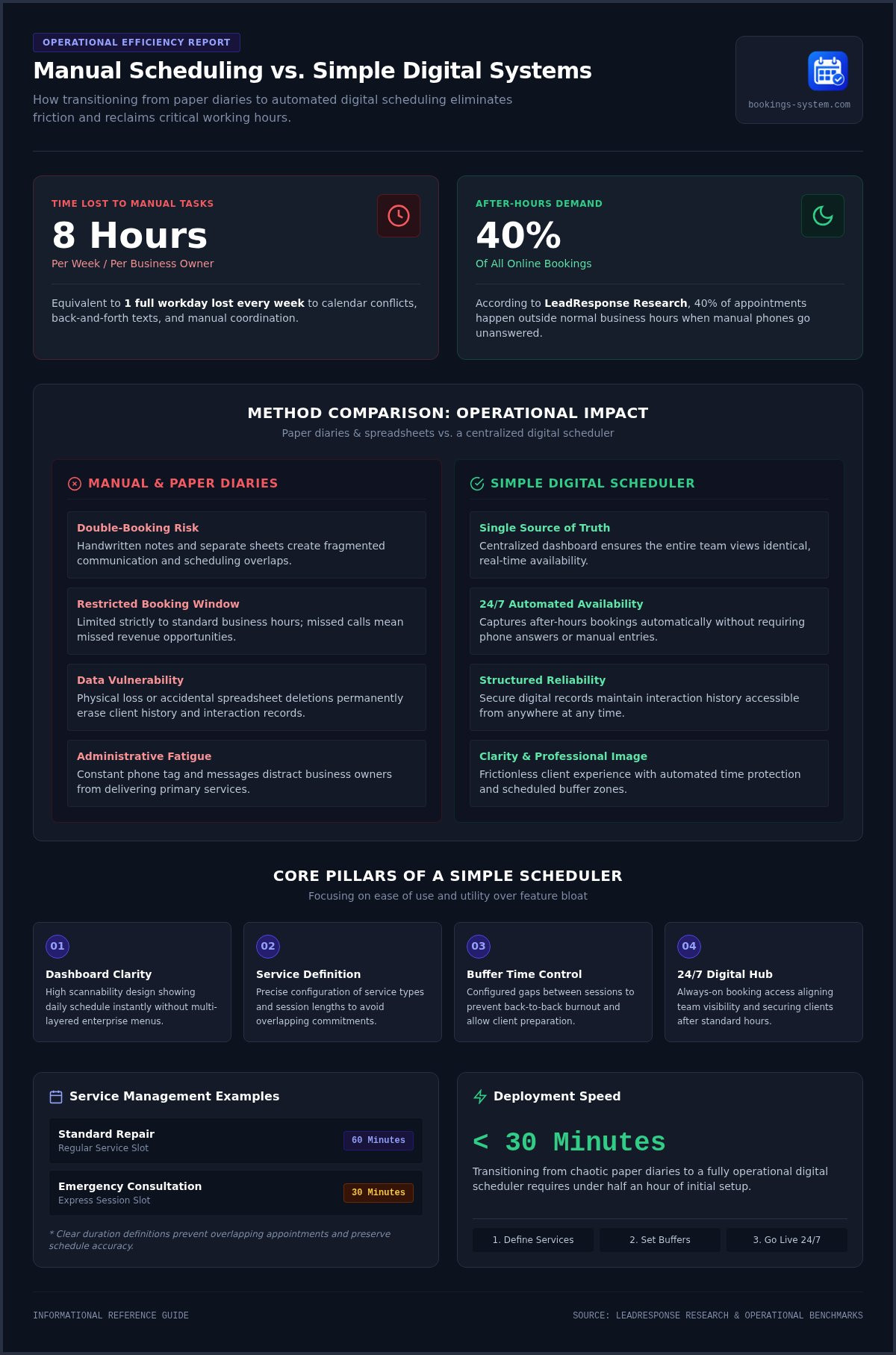
The average business owner spends up to eight hours every week managing calendar conflicts and manual booking tasks. That is a full workday lost to the friction of back and forth texts and missed calls. If you feel overwhelmed by the logistical weight of your own success, you are not alone. Finding a simple appointment scheduler for business is often the first step toward a more sustainable way of working.
It is frustrating when your calendar feels like a source of stress rather than a tool for growth. You likely started your business to serve your community, not to act as a full time receptionist. This guide will show you how to transition from scheduling chaos to a streamlined digital calendar that saves time and reduces errors. We will look at how to centralize your bookings and use automated organization to build a professional image for your customers. You will learn how to set up a system that works in the background so you can finally focus on your primary objectives with total clarity.
Key Takeaways
- Understand the hidden costs of manual scheduling and how a digital assistant removes the risk of double-bookings.
- Identify the core pillars of a simple appointment scheduler for business that prioritize ease of use over unnecessary features.
- Learn how a centralized dashboard simplifies service management by organizing your offerings and availability in one view.
- Follow a quick setup guide to transition your calendar from paper to a streamlined digital platform in under 30 minutes.
- Discover how modest automation helps you maintain a professional image while focusing on your primary business goals.
Why Your Business Should Move Beyond the Paper Appointment Diary
Many business owners rely on a physical diary because it feels familiar and secure. You can physically turn the pages and see your notes in your own handwriting. However, this manual approach often hides growing inefficiencies that slow down your daily operations. A simple appointment scheduler for business acts like a digital assistant that never sleeps, handling the logistical weight of your calendar while you focus on your customers.
Manual scheduling carries hidden costs that eventually impact your professional reputation. When you rely on phone calls or handwritten notes, you risk double-bookings and fragmented communication. These errors create a sense of chaos that clients notice. Moving to a digital system acts as a centralized service calendar for the team, ensuring everyone sees the same availability in real time. It replaces the uncertainty of a paper book with a single source of truth that is accessible from anywhere.
The Limitations of Manual Coordination
Spreadsheets often seem like a logical step up from paper, but they eventually fail as your client list grows. They lack real-time updates and are prone to accidental deletions or data entry errors. If you lose a physical diary or a set of loose notes, you lose your entire history of client interactions. Perhaps most importantly, manual systems limit your business to your standard working hours. Industry data from LeadResponse Research indicates that 40% of online appointments are booked outside of normal business hours. If you aren't available to answer the phone at night, you may be losing customers to a competitor who offers automated booking access.
The Immediate Relief of Digital Organization
Switching to a digital system provides immediate clarity for your entire team. A centralized view gives you real-time visibility into your entire week at a single glance, removing the need to flip through pages to find an open slot. This transition also boosts your professional image. Clients appreciate having a modern, frictionless way to view your availability without the back and forth of multiple messages. Digital scheduling is the backbone of modern service businesses.
The emotional shift from paper-based control to digital clarity is a major milestone for any growing company. It replaces the anxiety of a cluttered desk with the calm of a structured dashboard. Instead of worrying about a forgotten note, you can trust a simple appointment scheduler for business to maintain order 24/7. This shift allows you to operate with precision, ensuring your team is aligned and prepared for every booking that comes through your page.
The 4 Pillars of a Truly Simple Appointment Scheduler
A truly effective scheduling system relies on four foundational elements. These pillars ensure that the software remains a helpful assistant rather than a complex burden. When these components work together, they create a predictable environment where you can manage your time with confidence. Choosing a simple appointment scheduler for business means prioritizing these core functions over flashy, unnecessary features.
Dashboard Clarity vs. Feature Bloat
Many enterprise platforms overwhelm users with deep menus and complex settings. This feature bloat often leads to daily administrative fatigue. A clean user interface is essential because it allows for high scannability. When you open your business management dashboard, you should immediately see your schedule for the day. You don't want to dig through layers of software to find a client's name or a specific booking time.
A utilitarian design helps you find essential details in seconds. It uses clear labels and a logical layout to mirror the efficiency of your own service. This simplicity is a high performance feature. It ensures that you spend less time managing the tool and more time performing your primary work. If you are looking for a way to simplify your daily routine, you can explore a streamlined scheduling platform that focuses on these essential views.
Managing Services and Availability
Clear service management is the second pillar of a reliable system. You must be able to define exactly what you offer and how long each session lasts. For instance, you can set up distinct service types such as a "Standard Repair" for sixty minutes or an "Emergency Consultation" for thirty minutes. This precision ensures that your calendar remains organized and prevents overlapping commitments.
Defining buffer times is also a critical part of this process. These small gaps between appointments prevent back to back burnout and give you time to prepare for the next client. By setting these rules within your simple appointment scheduler for business, you communicate your availability clearly without the need for back and forth phone tag. This protects your energy and ensures you provide consistent quality to every customer.
The final two pillars focus on boundaries and the client experience. Flexible working hours management allows you to protect your personal time by blocking out breaks, admin periods, or holidays. This ensures the system only accepts bookings when you are truly available to work. Finally, a customer facing booking page must be intuitive. It should provide a straightforward path for clients to select a service and a time slot. If the process is easy for them, it builds trust and reinforces your professional image from the very first interaction.
Simple vs. Enterprise: Why More Features Aren’t Always Better
Enterprise software often promises to solve every possible business problem. These platforms include complex APIs, deep permission matrices, and hundreds of integrations. For a local service provider, this "all-in-one" approach is often just bloat. A simple appointment scheduler for business prioritizes purpose-built simplicity over overwhelming options. It provides exactly what you need to manage your day without the weight of unnecessary tools.
There is a hidden cost to complex software known as the Learning Curve Cost. Every hour you spend watching tutorials or navigating sub-menus is an hour you aren't billing. Small teams need software that works immediately. If a tool requires weeks of training or a dedicated administrator, it's a liability rather than an asset. Purpose-built tools remove these distractions so you can stay focused on your customers.
The Myth of the "Free" Complex Tier
Many enterprise platforms attract users with a "free" tier. However, these plans often hide essential features behind expensive upgrades. You might start at no cost but quickly find that automated reminders or service management require a high-tier subscription. This creates a bait and switch experience that complicates your budgeting. A transparent, flat-rate model is much more dependable for a growing business. A flat $19.99 monthly fee allows for predictable costs. You don't have to worry about seat-based pricing or hidden add-ons as your client list grows.
Focusing on What Matters: Bookings and Services
Industry observations suggest that most businesses only use about 10% of the features found in large enterprise suites. The remaining 90% often leads to analysis paralysis. When you have too many choices, you spend more time configuring the tool than actually using it to book clients. A tool that does one thing-scheduling-exceptionally well provides immediate relief. It allows you to organize your services and view your calendar without filtering through irrelevant data. This focused approach ensures your administrative tasks remain frictionless and fast.
Affordable appointment management software often outperforms expensive suites for small teams because it respects your time. It acts as a quiet expert in the background, providing the structure you need without being flashy. By choosing simplicity, you avoid the trap of distraction-heavy software. You regain control over your workday and can focus on the primary objectives that actually drive your revenue.
How to Set Up Your Business Scheduler in Under 30 Minutes
Setting up a simple appointment scheduler for business does not require a technical degree. You can move from a paper diary to a digital dashboard in about 30 minutes. First, create your account to access the cloud-based dashboard. This centralized view is where you will manage your entire operation. It is designed to be intuitive, so you can start organizing immediately without a long learning curve.
Once you are inside the dashboard, your next task is to define your offerings. Clear service management is vital for a smooth customer experience. You should list each service with a specific duration and a clear title. This ensures the system only books time slots that actually fit the work you perform. It also prevents the common error of overlapping appointments that often happens with manual diaries.
Configuring Your Service List
When naming your services, use language that your customers already understand. For example, use "Standard Consultation" instead of vague internal codes. Use the description field to set expectations early. If a client needs to bring specific documents or arrive ten minutes early, state that clearly in the service details. If you offer many different types of appointments, organize them into categories. A local repair shop might group services under "Diagnostics," "Routine Maintenance," and "Emergency Repairs" to help clients navigate the list quickly.
Customizing Your Booking Page
Your customer facing booking page is the final piece of the puzzle. Ensure your contact information is prominent and accurate so clients can reach you if they have specific questions. Once your page is ready, you can share the link across your digital channels. You can place this link in your email signature, on your website, or in your social media profiles. This gives your clients a direct path to book your time 24/7 without needing to call your office.
Before you share your link with everyone, test the client experience yourself. Open the booking link on your mobile phone and schedule a test appointment. If the flow feels frictionless and the confirmation arrives in your dashboard instantly, your system is ready for use. You can get started with your business dashboard today to see how quickly you can reclaim your time. This simple step ensures your professional image remains intact from the very first booking.
Finally, set your working hours to protect your personal time. Block out recurring breaks, lunch hours, or holidays well in advance. This ensures the system only accepts bookings when you are truly available to work. By establishing these boundaries early, you prevent the burnout that comes from a disorganized schedule. You gain the relief of knowing your calendar is managed by a reliable assistant that never forgets a detail.
Reclaiming Your Time with Booking Service
Choosing a simple appointment scheduler for business is about more than just software. It is about finding a reliable assistant that allows you to focus on your craft. Booking Service acts as a quiet expert, working in the background to maintain order while you serve your customers. This platform shifts your role from a part time administrator to a full time professional. It provides the structure you need to manage your day with total confidence. You can finally stop worrying about the logistics of your calendar and start focusing on your primary objectives.
Our business management dashboard is designed to feel approachable and helpful. It avoids the clutter of enterprise tools in favor of streamlined simplicity. This focus on functional clarity ensures that you spend less time managing your software and more time performing billable work. By centralizing your bookings, you create a single source of truth for your entire operation. This stability is essential for any growing business that values efficiency and customer satisfaction.
The Booking Service Advantage
Our platform prioritizes a welcoming, professional design that reflects well on your brand. It is built specifically for local pros, including repair services, mechanics, and technicians, who need a dependable way to coordinate their time. The organized calendar view ensures that your entire team stays aligned. You can see every booking at a glance, which removes the stress of manual tracking. This visibility helps you manage staff coordination without the need for constant meetings or follow up texts. It creates a frictionless environment where everyone knows exactly where they need to be.
Start Your Transition Today
A flat subscription of $19.99 per month makes Booking Service a high ROI business tool. It is an affordable investment that pays for itself by reclaiming hours of your time every week. Many business owners find that the time saved on administrative tasks allows them to take on additional clients, quickly offsetting the monthly cost. Because we want you to feel the relief of digital order firsthand, we offer your first month free. This trial removes all entry risk and lets you experience the benefits before making a long term commitment.
The transition to digital organization takes less than 30 minutes. You can follow our simple four step setup process to launch your booking page and start accepting appointments today. It's time to replace scheduling chaos with a streamlined system that works as hard as you do. You can start your free month with Booking Service and take control of your calendar right now. Embrace the simplicity of a tool designed to help your business thrive and provide a professional experience for every customer.
Step Into a More Organized Future
Moving away from a paper diary is a significant step toward reclaiming your time and mental clarity. By choosing a simple appointment scheduler for business, you replace the friction of manual coordination with a dependable digital assistant. You have seen how a streamlined dashboard can centralize your services and protect your personal boundaries. This transition doesn't require technical expertise or weeks of training. It only requires a commitment to a more orderly way of working.
Booking Service is designed specifically for service-based businesses that value efficiency over complexity. You can enjoy a predictable $19.99 monthly flat fee with no hidden costs as you grow. There is no credit card required for the first month, so you can experience the relief of an organized calendar view without any initial commitment. Get started with your free month of Booking Service and see how digital organization can transform your daily routine. It's time to build a more professional and sustainable business for the future.
Frequently Asked Questions
How do I choose the right appointment scheduler for my small business?
Focus on functional clarity and ease of use. Look for a platform that offers a centralized dashboard without unnecessary bloat or complex technical requirements. A simple appointment scheduler for business should prioritize real-time visibility and straightforward service management. Avoid tools that require extensive training or developer help. Your goal is to find a reliable partner that works in the background so you can focus on your primary work.
Can I manage multiple staff members with a simple scheduling tool?
Yes, you can coordinate a team using a centralized business management dashboard. This provides an organized calendar view where you can see all bookings for different staff members in one place. It helps prevent double-bookings and ensures everyone stays aligned with the daily schedule. This structure is essential for maintaining a professional image as your team grows and your service list expands over time.
Is it hard to switch from a paper diary to an online booking system?
The transition is much faster than most people expect. You can move from a physical diary to a digital system in about 30 minutes. The process involves creating an account, defining your services, and setting your availability. Once your customer facing booking page is live, you gain the immediate relief of automated organization. It replaces the anxiety of lost notes with a stable, cloud-based record.
What happens if I need to change my working hours or block out time?
You can update your availability instantly through your dashboard settings. If you need to block out a holiday or a recurring break, the system will immediately stop accepting appointments for those times. This protects your personal time and ensures you are never surprised by a booking when you are unavailable. It gives you full control over your workday without the need for manual phone calls.
Do clients need to download an app to book an appointment?
Clients do not need to download any software or apps to book with you. They simply visit your mobile friendly booking page through a standard web browser on their phone or computer. This frictionless process makes it easy for them to select a service and a time slot in seconds. Reducing barriers to booking helps you capture more customers, especially during the hours when your office is closed.
Is my business too small for a professional scheduling platform?
No business is too small to benefit from better organization. Even solo practitioners lose hours every week to manual scheduling tasks and phone tag. Using a professional platform shows your clients that you value their time and your own. It provides a structured way to grow your operations. A simple appointment scheduler for business helps you manage your current workload efficiently while preparing for future success.
How much does a simple appointment scheduler typically cost?
Booking Service offers a flat subscription fee of $19.99 per month. This predictable cost helps small businesses manage their budgets without worrying about hidden fees or seat-based pricing as they grow. To ensure the platform is the right fit for your needs, you can access a first month free trial. This allows you to test the dashboard and organized calendar view at no initial cost.
Can I use this scheduler for a mobile service business?
This scheduler is an excellent fit for mobile professionals like mechanics, cleaners, or repair technicians. Because the dashboard is cloud-based, you can manage your appointments from any location with internet access. You can view your organized calendar on a mobile device between jobs to see your next destination. This flexibility ensures that your schedule remains accurate even when you are working away from a traditional office.


