

Did you know that 40% of online appointments are booked after you've already closed for the day? According to recent analytics, businesses that rely strictly on phone calls are missing two out of every five potential bookings. Implementing online appointment scheduling for small business is no longer just a luxury. It's a vital tool to capture revenue and meet the 82% of consumers who now prefer self-service booking portals over traditional phone calls.
We know how exhausting it is to manage double-booked slots and endless games of phone tag. You deserve to focus on your billable work instead of administrative errors. This guide will show you how to reclaim your time and eliminate scheduling mistakes with a streamlined digital system. We'll preview the top tools for 2026, explain how to avoid hidden transaction fees, and show you how a centralized calendar creates a predictable rhythm for your business growth. You'll learn how to transition from manual chaos to a simple, automated process that works for you around the clock.
Key Takeaways
- Shift your focus from answering phone calls to managing a pre-filled calendar by adopting a proactive scheduling strategy.
- Discover how online appointment scheduling for small business serves as a dependable digital bridge between your available hours and your customers' needs.
- Compare flat-fee software subscriptions against transaction-based models to ensure your business maintains a predictable monthly budget.
- Learn the essential steps to audit your service durations and staff availability for a frictionless transition to digital booking.
- Identify the core dashboard features that centralize your operations and provide an organized view of your entire work week.
The Shift to Online Appointment Scheduling for Small Business
Managing a service-based business often feels like a constant reaction to outside demands. You answer the phone mid-task or return texts during your personal time. Modern appointment scheduling software acts as a digital bridge between your specific availability and your customer's needs. It moves you from a reactive state to a proactive one. Instead of chasing leads, you simply open your dashboard to see a pre-filled calendar. This shift provides a profound sense of order and relief. It's like having a 24/7 receptionist that never misses a detail or forgets a name. It allows you to focus on the work you enjoy while the system handles the logistics of coordination.
Why Manual Scheduling is Costing You Growth
Manual systems are prone to friction and hidden costs. Every back-and-forth call or text thread takes several minutes of your focus. If you spend just one hour a day on the phone, that equals five hours a week stolen from your billable work. Paper diaries also introduce the risk of human error. It's easy to smudge a name or misread a date, which leads to double-bookings and frustrated clients. For repair services, a missed call is almost always missed revenue. If you aren't available to answer, the customer usually calls the next business on the list. Using online appointment scheduling for small business ensures you never lose a lead just because you were busy doing your job. It keeps your business accessible at all times without requiring your physical presence.
The 2026 Standard for Customer Experience
In 2026, self-service booking is the expected standard for professional services. Customers don't want to wait for your business hours to reach you; they want to secure a slot at 10 PM while they're thinking about it. Providing a professional booking portal builds instant trust before the first service even begins. When a client receives an immediate confirmation, they feel confident that their needs are being met. This level of organization sets a high standard for your brand. Automated reminders are also a vital part of this experience. They significantly reduce no-shows and late arrivals by keeping the appointment top-of-mind, which protects your time and keeps your daily rhythm steady. A predictable schedule allows for better resource management and less daily stress. It creates a seamless experience that respects both your time and the customer's busy life.
Core Features of an Effective Small Business Scheduling Tool
Many platforms prioritize complex payment integrations or AI assistants. However, the most effective tools focus on functional clarity and organization. A reliable system for online appointment scheduling for small business should simplify your day, not add new layers of technical debt. It acts as a quiet expert that manages your calendar while you focus on delivering high-quality service.
The Business Management Dashboard
A centralized dashboard serves as the single source of truth for your entire operation. It provides an immediate overview of your daily, weekly, and monthly commitments. You can coordinate staff working hours and adjust service availability from one screen. This level of coordination is essential because manual errors often stem from fragmented information. According to the U.S. Chamber of Commerce guide to online scheduling tools, businesses lose significant productivity when they lack a unified system for coordination. Having customer contact details automatically organized within the dashboard ensures you always have the necessary context before a meeting starts.
The Customer-Facing Booking Portal
Your booking page is often the first interaction a client has with your brand. It must be professional, clear, and easy to use. A frictionless interface increases conversion rates by removing barriers to entry. If a page is difficult to navigate or cluttered with unnecessary fields, potential clients will likely leave. Mobile-responsive design is also mandatory. Most people book services while they're on the move, so the portal must look great on a smartphone. It's about meeting the customer where they are.
Present your services with clear descriptions and durations. This transparency helps clients choose the right option without needing to call you for clarification. You can define staff assignments and specific prices to ensure the system handles the heavy lifting of logistics. This granularity allows you to account for setup periods or cleaning time between tasks. If you're looking for a way to bring this order to your business, you can explore an organized calendar view that keeps your team on track. This automation prevents double-bookings and ensures that your schedule remains realistic and manageable. It replaces the stress of a paper diary with the calm efficiency of a digital system.
Evaluating Software Costs: Subscription vs. Transaction Models
Choosing the right cost structure is just as important as the features themselves. Many providers offer "free" software that actually relies on per-transaction commission models. While this seems low-risk, it creates a "success tax" where your costs rise as your business grows. In contrast, a flat-fee SaaS subscription provides predictable monthly overhead. This transparency allows you to budget with confidence. A Forbes Advisor scheduling app evaluation highlights that core feature sets and subscription transparency are critical when selecting the right platform. You don't want to discover hidden fees after you've already moved your operations to a new system.
Free tools often come with significant limitations. They might restrict the number of users or hide essential features behind a paywall. This "freemium" approach can lead to a fragmented experience where you're constantly prompted to upgrade. A professional system for online appointment scheduling for small business should offer everything you need in one place. It acts as a quiet expert that grows with you without adding complexity or unexpected costs.
Predictable Pricing for Long-Term Planning
For repair services and specialized trades, maintaining healthy margins is a priority. A standard monthly fee ensures your software costs don't fluctuate based on your volume of work. You won't be penalized for booking more clients or expanding your reach. This fixed cost offers psychological relief. It removes the stress of calculating variable fees every month. You can focus on your primary objectives while your digital assistant handles the logistics at a set price. When your overhead is fixed, every new booking directly improves your bottom line.
What to Look for in a Free Trial
A trial period is the best way to test functional clarity before you commit. Use this time to assess the ease of setup. You should be able to configure your services and availability within the first hour. Test the dashboard responsiveness on both your desktop and your smartphone. A tool for online appointment scheduling for small business must work wherever you are. Most importantly, evaluate whether the platform truly reduces your daily administrative load. If you aren't spending less time on the phone after the first month, the system isn't serving its purpose. The goal is to find a partner that simplifies your operations and provides a clear pathway for growth.
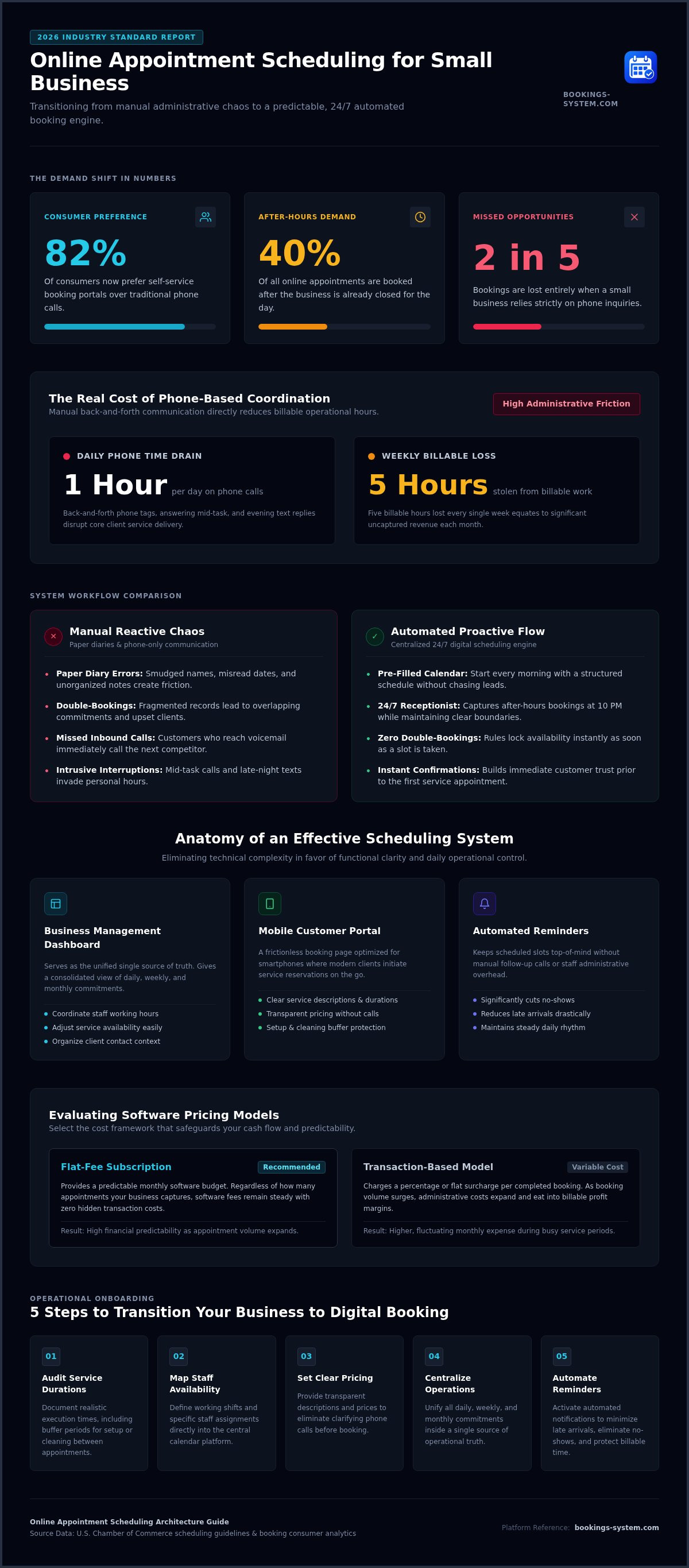
5 Steps to Transition Your Business to Online Booking
Transitioning from a paper diary to a digital system is a significant step toward reclaiming your time. It empowers you to master your own schedule without needing a middleman or a virtual receptionist. This process replaces manual coordination with a dependable structure that works for you. Follow these five logical steps to implement online appointment scheduling for small business effectively and ensure a smooth transition for your team.
- Audit your services. List every task you offer and determine a standard duration for each. Accurate timing is the foundation of an organized calendar.
- Configure your dashboard. Enter your staff's working hours and general business availability. This step creates the boundaries the system needs to function correctly.
- Migrate your existing data. Take your current paper diary or spreadsheet and enter all future appointments into the new system. This prevents double-bookings during the crossover period.
- Launch your booking page. Link your new portal to your website and social media profiles. Visibility is key to encouraging your customers to use the new system.
- Train your team. Show your staff how to view the organized calendar and update their status. When everyone understands the dashboard, the entire business runs more efficiently.
Organizing Your Service Menu
A clear service menu reduces customer confusion and increases conversion rates. Group similar services into categories to help clients find what they need quickly. Use simple, utilitarian descriptions that answer common questions about what each service includes. It is also vital to set buffer times between appointments. These short breaks allow for cleanup, setup, or travel time, preventing the stress of back-to-back scheduling. This structure maintains order and ensures you never feel rushed during your workday. It keeps your schedule realistic and manageable.
Communicating the Change to Clients
Your clients will appreciate the convenience of self-service once they understand how it works. Update your voicemail greeting and email signature with your new booking link. Encourage clients to use the portal for faster service and instant confirmation. This shift creates a professional first impression and shows that you value their time as much as your own. If you're ready to modernize your workflow and eliminate scheduling errors, you can start your free first month trial today. This simple change replaces manual coordination with streamlined automation, allowing you to focus on your primary business objectives with total peace of mind.
Streamline Your Operations with Booking Service
Booking Service acts as a quiet expert for your daily operations. While enterprise-level tools often overwhelm small teams with unnecessary complexity, our platform focuses on functional clarity. We provide a dependable structure so you can focus on your primary business goals. Implementing online appointment scheduling for small business shouldn't feel like a second job. Instead, it should act as a reliable assistant that removes friction and replaces it with streamlined simplicity. It's about giving you the tools to manage your time without the need for technical expertise.
A Dashboard Built for Functional Clarity
The intuitive design of our dashboard ensures you spend your time working, not managing software. You can access every appointment, service detail, and staff schedule in one organized calendar view. This centralized approach is specifically designed for the practical needs of repair services and small teams. You can coordinate working hours and adjust service durations with just a few clicks. By keeping all information in one place, you eliminate the risk of fragmented data and administrative errors. It is a straightforward solution that respects your time and mental clarity. It allows you to maintain a professional image while keeping your internal processes modest and efficient.
Start Your Professional Transformation Today
Choosing a scheduling partner shouldn't involve hidden costs or scaling fees. We offer a flat $19.99 monthly fee to keep your overhead predictable and transparent. This allows you to plan for long-term growth without worrying about a "success tax" as your client list expands. Many small businesses have already replaced their paper diaries with our digital system to reclaim their time and reduce stress. The transition to an automated system provides immediate relief from the burden of manual coordination. It creates a sense of stability that allows you to focus on delivering excellent service to your clients.
You deserve a system that works as hard as you do. Experience the benefits of an organized schedule and professional customer portal without any initial commitment. A reliable tool for online appointment scheduling for small business is the most effective way to ensure you never miss a booking again. Get started with your free month of Booking Service today and see how a streamlined dashboard can transform your daily rhythm. By choosing a partner that values simplicity, you ensure that your business remains efficient, professional, and ready for growth in 2026.
Take Control of Your Calendar Today
Transitioning to a digital system is a practical step toward business maturity. You've learned how a centralized dashboard removes the friction of manual coordination and why a flat-fee model protects your profit margins. Implementing online appointment scheduling for small business ensures your brand remains accessible to customers around the clock without requiring your constant attention. It replaces the chaos of paper diaries with a steady, predictable rhythm that allows you to work without interruption.
Booking Service supports repair services and small businesses worldwide with a platform built for functional clarity. Our predictable $19.99 monthly subscription provides the structure you need to focus on your primary objectives. You don't have to worry about hidden fees or complex technical setups. We invite you to experience this relief firsthand. Start your free month of professional scheduling today and see how an organized calendar can transform your workday. Reclaiming your time starts with a single, simple choice.
Frequently Asked Questions
Is online appointment scheduling secure for my customers?
Yes, cloud-based platforms prioritize data protection to keep customer information safe. When you use a professional system, you move away from vulnerable paper records that can be lost or seen by unauthorized people. Our platform ensures that client details are stored in a centralized dashboard where only you and your team can access them. This creates a secure environment that builds trust with your clients from their very first interaction and keeps your records organized.
Can I manage multiple staff members with one scheduling dashboard?
Yes, you can coordinate multiple staff members from a single business management dashboard. The system allows you to assign specific services to different team members and set their individual working hours. This prevents scheduling conflicts and ensures that everyone knows exactly where they need to be. It's a practical way to manage a growing team without the confusion of multiple separate calendars. You maintain full control over the entire operation from one central location.
What happens if I need to change my working hours or service availability?
You can update your availability instantly through your dashboard settings. If you need to take a day off or change your standard service hours, the system reflects these changes on your customer-facing booking page immediately. This level of control ensures that clients can only book slots when you're actually available. It removes the stress of having to call customers to reschedule after a manual booking error occurs. You stay in command of your time and your schedule.
Do I need to install any software on my computer to use the booking system?
No installation is required because the platform is entirely cloud-based. You can access your organized calendar view and dashboard from any web browser on your desktop, tablet, or smartphone. This accessibility allows you to manage your business from the office or while you're out on a job site. It eliminates the need for technical maintenance or manual software updates, keeping your operations simple and efficient while ensuring you stay connected to your schedule at all times.
How much does a professional appointment management tool typically cost?
Professional tools vary, but Booking Service offers a flat fee of $19.99 per month. This transparent pricing model helps small businesses maintain a predictable budget without worrying about hidden transaction fees. We also provide a free first month trial so you can test the functional clarity of the system before committing. This approach ensures you get a high-quality online appointment scheduling for small business at an affordable and steady cost that scales with your professional success.
Can clients book appointments outside of my regular business hours?
Yes, your customer-facing booking portal stays active 24 hours a day. While you only perform services during your set working hours, clients can schedule their appointments whenever it's convenient for them. This is a significant advantage because many people prefer to handle their errands in the evening. The system acts as a silent assistant that captures new leads while you're away from your phone or desk. It ensures you never miss a potential booking opportunity or a new client.
Is it difficult to move my existing appointments into a digital system?
The transition process is straightforward and methodical. You can migrate your existing appointments from a paper diary or spreadsheet by manually entering them into your new dashboard. While this takes a small amount of initial effort, it prevents double-bookings during your first few weeks of digital operation. Once your current schedule is entered, the system takes over the coordination of all future bookings automatically. This process provides immediate relief and sets a new professional standard for your brand.
What are the benefits of a cloud-based appointment dashboard over a spreadsheet?
A cloud-based dashboard offers automation that a static spreadsheet cannot provide. It updates in real time as clients book themselves, which eliminates the need for manual data entry. You also gain an organized calendar view that shows your entire week at a glance. Unlike a spreadsheet, the system can send automated reminders to clients. This feature is essential for reducing no-shows and maintaining a professional standard for online appointment scheduling for small business while saving you hours of administrative work.


