

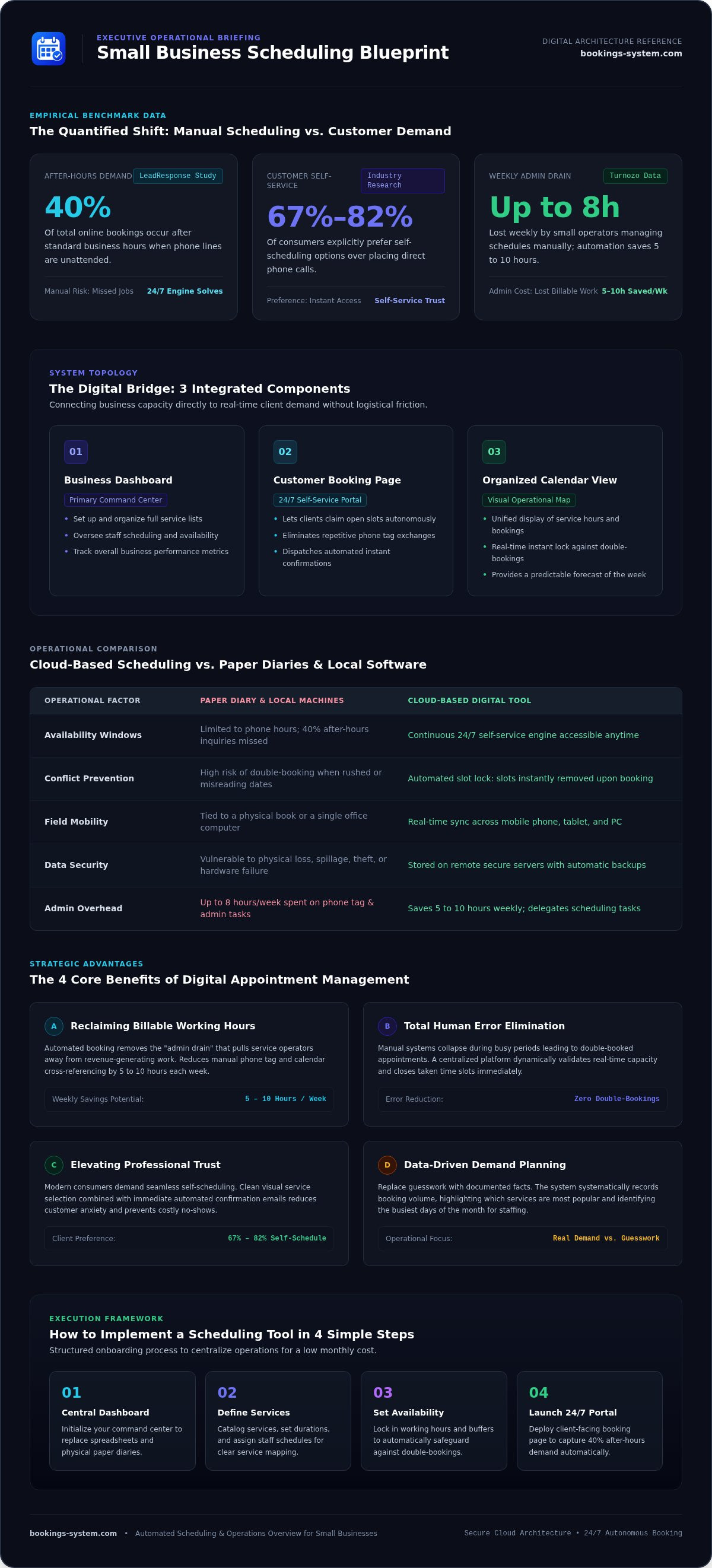
Imagine it's 9:00 PM on a Sunday evening. You're scrolling through missed texts and cross-referencing a paper diary to confirm tomorrow's jobs. This manual process is a common source of stress. Research from LeadResponse indicates that 40% of online bookings occur after business hours. If you aren't available to answer the phone, you might miss those opportunities. A dependable small business scheduling tool solves this problem by providing a 24/7 booking engine. It acts as a modest facilitator that handles logistics while you rest.
You know that your time is valuable. Managing a calendar shouldn't feel like a second job. According to data from Turnozo, small business operators can spend up to eight hours a week on manual scheduling tasks. This article explains how to reclaim that time by using a centralized dashboard. You'll learn how automated organization removes administrative chaos and reduces the frequency of missed appointments. We'll also discuss how a professional booking page builds trust with your customers. This guide provides a clear path to a more organized and efficient business in 2026.
Key Takeaways
- Define the scheduling tool as a digital bridge that connects your availability directly to your customers for effortless management.
- Discover how a small business scheduling tool eliminates administrative busywork and prevents the frustration of double-bookings.
- Compare the reliability of a cloud-based dashboard with the physical risks of paper diaries to keep your business records secure.
- Follow four simple steps to set up your services and availability for a professional, automated booking experience.
- Learn how to centralize your scheduling for a low monthly cost to reclaim your time and focus on business growth.
What is a Small Business Scheduling Tool?
A small business scheduling tool acts as a digital bridge between your availability and your customers. It isn't just a digital version of a paper calendar or a basic diary. It's a complete management system designed to handle the logistical side of your daily operations. For professionals like mobile mechanics, repair shops, and freelancers, this tool provides a centralized way to manage time without the constant distraction of phone calls or text messages. By implementing appointment scheduling software, you move away from messy spreadsheets and toward a structured, professional environment. This system allows you to focus on your actual work while the software handles the coordination.
The Core Components of Modern Scheduling
A reliable scheduling system consists of several integrated parts that work together to simplify your day. The business dashboard is your primary command center. This is where you set up your service list, manage staff schedules, and view your business performance. It provides the oversight you need to make informed decisions about your time. Alongside this, the customer booking page serves as a 24/7 portal. It lets your clients help themselves to open slots, which reduces the need for back-and-forth communication. The organized calendar view then pulls everything together into a clear visual map. It displays your service hours and booked appointments in one place, giving you a predictable look at your week ahead.
Cloud-Based vs. Local Software
The choice between cloud-based and local software is a matter of practical utility. Cloud-based access is especially valuable for mobile workers who spend their days in the field. It allows you to access your schedule from any device with an internet connection. If a customer cancels or reschedules while you're on the road, the update happens in real-time across your phone, tablet, and office computer. You won't need to perform manual syncing or worry about outdated information. This model also enhances your business security. Local software stores data on a single machine, which is vulnerable to hardware failure or theft. A cloud-based small business scheduling tool stores your information on secure remote servers. Your data is backed up automatically, ensuring that your customer details and appointment history remain safe and accessible at all times.
The 4 Primary Benefits of Digital Appointment Management
Switching to a digital system provides immediate relief from the friction of manual coordination. It replaces the chaos of paper notes and scattered text messages with a structured, automated flow. This transition allows you to move from a reactive state to a proactive one. You'll spend less time reacting to scheduling conflicts and more time focusing on your primary business goals.
Reclaiming Your Time from Admin Tasks
Automated booking saves many owners up to 5-10 hours of phone time every week. This time is often lost to playing phone tag or answering basic questions about your availability. By using a small business scheduling tool, you delegate these repetitive tasks to a system that works while you're busy in the shop or out in the field. Many owners struggle with the administrative burden of manual scheduling without realizing how much it impacts their bottom line. Admin drain is the hidden cost of manual booking that pulls you away from billable work. Reducing this drain ensures that your energy goes toward service delivery rather than logistics.
Human error is another significant factor in manual systems. You might misread a date or accidentally book two clients for the same time slot when you're rushed. A digital platform eliminates double-bookings by checking your real-time availability. It ensures that once a slot is taken, it's removed from the public view immediately. This accuracy prevents the awkwardness of rescheduling a frustrated customer and protects your reputation for reliability.
Enhancing Your Professional Image
Modern customers value convenience and speed. Research suggests that between 67% and 82% of consumers prefer self-scheduling over making a phone call. An organized booking interface builds trust by showing that your business is modern, efficient, and reliable. It provides a clean, visual representation of your services that customers can browse at their own pace. Providing instant confirmation emails reduces customer anxiety and prevents no-shows. It gives your clients the certainty they need without requiring a single minute of your personal time.
A digital system also organizes your data for future planning. You can track which services are most popular and identify your busiest days of the month. This information helps you adjust your hours or staffing levels based on actual demand rather than guesswork. Managing your business through an organized calendar view makes these insights easy to find. It turns your schedule into a tool for growth rather than just a list of tasks. This centralized approach ensures that you always have a clear map of your business performance.
Digital Scheduling vs. Paper Diaries: A Practical Comparison
Many business owners stick to paper because it feels familiar. The "if it ain't broke, don't fix it" mentality is common in busy shops. However, a paper diary is a single point of failure for your entire operation. A single coffee spill or a misplaced book can erase months of customer history and upcoming appointments. Physical diaries are also difficult to navigate. Searching for a specific client’s details requires flipping through hundreds of handwritten pages. A digital database allows you to find that same information with a simple search in seconds.
When evaluating digital scheduling applications, you must consider the cost of missed opportunities. If you are working on a repair or driving to a job, you cannot answer the phone. Every missed call is a potential lead that moves on to a competitor. A small business scheduling tool acts as a reliable assistant that never sleeps. It captures bookings at 9:00 PM on a Sunday or while you are busy under a vehicle. This ensures you never lose revenue simply because you were focused on your work.
The Hidden Costs of Manual Systems
Manual systems carry hidden financial burdens that affect your bottom line. A single no-show can waste an hour of billable time and fuel. Automated reminders cut these no-show rates by up to 50%, providing a direct return on investment. If a technician is sick, manual rescheduling requires dozens of individual phone calls. A digital system allows you to manage these changes with much less effort. Some owners try to use spreadsheets, but these often become just as messy as paper over time. They lack the automated features and clean structure of a dedicated management dashboard.
Accessibility and Mobility
Mobility is a requirement for modern service providers. If you leave your paper diary at the office, you lose access to your schedule at the job site. A cloud-based small business scheduling tool lives on your smartphone, giving you a visual map of your day from anywhere. Multiple staff members can view the same calendar simultaneously. This prevents the confusion of sharing one physical book. You get an at-a-glance view of your availability, allowing you to confirm new jobs instantly without checking back at the office. This level of coordination creates a frictionless experience for both you and your team.
How to Implement a Scheduling Tool in 4 Simple Steps
Implementing a small business scheduling tool is a straightforward process that replaces administrative chaos with a logical workflow. You don't need technical expertise or complex integrations to get started. By following a few structured steps, you can transition from a manual diary to a professional digital system in a single afternoon. This methodical approach ensures that your new system is ready to handle your workload without added stress.
Setting Up Your Service Menu
The first step is to define exactly what you sell. Create a clear list of your services and categorize them by type. For example, a repair shop might separate "Standard Maintenance" from "Emergency Diagnostics." Each service needs a standard duration so the system knows how much space to clear on your calendar. It's also vital to set realistic buffer times between appointments. These gaps allow for travel, cleanup, or unexpected delays in a previous job. Providing clear service descriptions ensures that customers book the right slot, which reduces the need for you to call them back for clarification.
Managing Your Availability
Once your services are ready, you must establish your working hours. Input your recurring schedule into the management dashboard to prevent customers from booking during your off-time. This creates a reliable boundary between your professional and personal life. Managing your time through a dedicated small business scheduling tool ensures that these boundaries are respected. You can also handle one-off changes easily. If you have a holiday or a personal appointment, you simply block those hours on the dashboard. This centralized service calendar acts as the single source of truth for your entire team. It ensures that everyone knows exactly where they need to be and when, without the need for verbal reminders.
After your calendar is set, you need to make it accessible to your clients. Share your unique booking link on your website, social media profiles, and even your physical business cards. This allows clients to book whenever they are ready, even if you are currently busy with another task. Finally, make it a habit to monitor your dashboard daily. This allows you to stay ahead of incoming appointments and adjust your resources as needed. You'll always have a clear view of your day before you even start work.
If you are ready to remove the complexity from your workday, start your free month with Booking Service today. This simple transition will help you reclaim your time and project a more professional image to your clients.
Streamlining Your Business with Booking Service
Booking Service provides a straightforward alternative to complex SaaS platforms. Many tools available in 2026 are designed for enterprise teams, which often results in a cluttered experience for smaller shops. This small business scheduling tool prioritizes functional clarity. It offers a dedicated dashboard for service management without the bloat of unnecessary features. At $19.99 per month, it's an affordable investment in your business infrastructure. We offer the first month free to ensure the system meets your practical needs before you commit.
Our core mission is to remove complexity for repair and service shops. You shouldn't have to spend hours learning how to manage your own calendar. Booking Service acts as a reliable assistant that handles the logistics so you can focus on your primary objectives. It provides a sense of relief by replacing administrative chaos with streamlined simplicity.
Focused Features for Real Businesses
The dashboard is a clean command center for your daily operations. You can manage your service list and staff availability without navigating through dense technical jargon. An organized calendar view allows you to see your entire workload in one place. This visual map helps you avoid the stress of overlapping appointments or forgotten details. It's built to be intuitive, ensuring you spend less time on software and more time on billable work.
The customer-facing booking page is your 24/7 assistant. It allows your clients to see your availability and book themselves into open slots. This professional portal matches the service-oriented tone of your business. It removes the complexity of back-and-forth texting and replaces it with a streamlined, intuitive process. Your customers will appreciate the convenience, and you'll appreciate the reduced administrative workload. This professional image helps build trust before you even meet the client.
Getting Started Today
Setting up your account is a methodical and brisk process. We value your time and mental clarity, so we've kept the signup simple. You won't encounter high-pressure sales tactics or hidden fees. Instead, you'll find a reliable partner that provides the structure you need to focus on your work. The process is designed to get you up and running as quickly as possible.
Starting your free trial lets you experience the relief of a centralized system immediately. You can input your services and hours to see how much time you'll save on coordination. Implementing a small business scheduling tool can lead to significant improvements in your daily efficiency and overall peace of mind. It's a practical step toward a more organized future.
Start your free month of organized scheduling today and experience the simplicity of a professional management system.
Moving Toward a More Organized Workday
Transitioning from manual coordination to a digital management system provides immediate relief for your daily operations. You've seen how a dedicated small business scheduling tool removes the friction of back-and-forth communication and protects your time from administrative drain. Replacing a physical diary with a cloud-based dashboard ensures that your data is secure and accessible from any job site. This structured approach allows you to focus on your primary work while the system handles the logistics of your calendar.
Booking Service is designed specifically for service and repair businesses that value efficiency over complexity. You can centralize your bookings and project a professional image without the need for technical expertise. It's time to reclaim your evenings and weekends from the stress of manual scheduling. Simplify your business scheduling for just $19.99/month; try your first month free. Taking this small step today creates a more predictable and stable environment for your business to grow in 2026. We're here to act as your reliable assistant and help you build a more organized future.
Frequently Asked Questions
Is a small business scheduling tool difficult to set up?
No. Setting up a small business scheduling tool is a methodical process. You define your services, input your working hours, and share your unique booking link. It's designed for repair shops and mobile mechanics who need simplicity. You can have a professional booking page ready in one afternoon without technical expertise. The dashboard guides you through each step to ensure your calendar is organized and functional from day one.
How much does scheduling software typically cost for a small shop?
Pricing varies across the industry, but Booking Service offers a straightforward rate of $19.99 per month. This subscription includes access to the full business management dashboard and organized calendar views. To help you evaluate the benefits for your specific shop, the first month is provided as a free trial. This transparent pricing model ensures you have a reliable assistant without the burden of hidden fees or long-term contracts.
Can I use a scheduling tool if I am a mobile mechanic?
Yes, this platform is specifically tailored for mobile mechanics and repair services. Since the dashboard is cloud-based, you can access your schedule from any smartphone or tablet while you're at a job site. This mobility allows you to confirm new appointments or check customer details without returning to an office. It provides a visual map of your day that travels with you, keeping your business organized on the road.
What happens if I need to change my working hours suddenly?
You can update your availability instantly through the management dashboard. If you need to block out time for a personal appointment or a holiday, you simply adjust your hours on the calendar. The customer-facing booking page updates in real-time, preventing clients from selecting those slots. This flexibility ensures you stay in control of your schedule while providing clear, accurate information to your customers at all times.
Do I need to install software on my computer to use a booking system?
No installation is required because the system is cloud-based. You access the scheduling platform through a standard web browser on your computer, tablet, or phone. This setup removes the need for manual updates or hardware-specific requirements. Your data stays synced across all devices automatically, allowing you to manage your business from the shop, your home, or out in the field without technical friction.
Will an online booking system reduce my no-shows?
Yes, automated reminders are a core feature that helps reduce no-shows. The system sends confirmation details to your customers immediately after they book a slot. Providing this instant communication builds trust and keeps your appointment top-of-mind for the client. Research from sources like SchedulingKit suggests that automated notification cadences can cut no-show rates by up to 50% compared to unconfirmed bookings, protecting your billable hours and fuel costs.
Is my customer data safe in a cloud-based scheduling dashboard?
Your data is stored on secure remote servers with automatic backups. This is often safer than a paper diary or a local spreadsheet, which can be lost, damaged, or stolen. A cloud-based small business scheduling tool ensures that your customer history and appointment details remain accessible even if your hardware fails. We prioritize functional clarity and security to provide a dependable environment for your business records.
Can I manage multiple staff members with one scheduling tool?
Yes, the dashboard allows you to coordinate schedules for multiple team members in one place. You can set individual working hours and service capabilities for each staff member. This centralized view prevents double-bookings and ensures that your resources are allocated efficiently. Everyone on your team can see the same organized calendar, which improves internal communication and removes the need for constant verbal updates or messy paper notes.


